


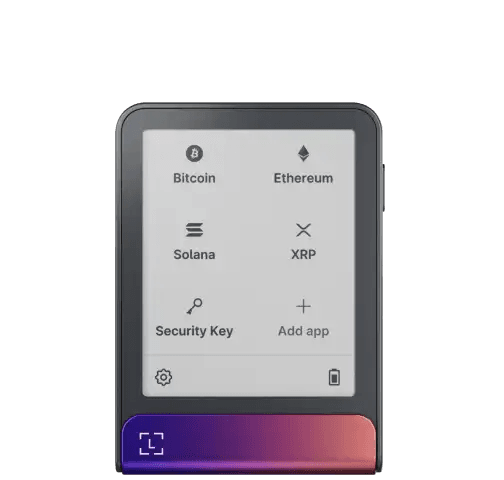
Ledger Flex is easy to misunderstand because its most visible upgrade looks cosmetic.
The 2.84-inch secure E Ink touchscreen is not valuable because it makes a hardware signer feel premium. It is valuable only if the larger trusted display changes how carefully you verify what you are about to authorise.
That is the entire case for the product.
Cryptophia’s judgment: Ledger Flex is a strong daily signer for active multi-chain users who will genuinely use the secure screen to review transactions. It is harder to justify for infrequent basic transfers, a Bitcoin-only vault or a buyer whose overriding requirement is fully open core firmware.
Affiliate disclosure: This review contains a tracked Ledger link. Cryptophia Research may earn a commission from a qualifying purchase at no extra cost to you. The conclusion is based on the signing model and trade-offs below. See our Affiliate Disclosure and How We Research.
The Ledger Flex decision map
| Decision area | What Flex improves | What it does not solve |
|---|---|---|
| Transaction review | Large secure E Ink touchscreen gives more room for addresses and human-readable intent | Opaque or unsupported transactions can still require incomplete or blind signing |
| Key isolation | Private keys remain inside Ledger’s Secure Element signing environment | A stolen recovery phrase still recreates the wallet elsewhere |
| Software trust | Tightly integrated device, applications and signed update process | Core secure operating system remains proprietary |
| Connectivity | USB-C, Bluetooth and NFC support frequent mobile and desktop workflows | More interfaces and services create a larger system to maintain |
| Recovery | Standard recovery plus optional physical and identity-based recovery products | More recovery choices can add complexity if the owner has no documented plan |
| Best fit | Frequent multi-chain signing where readable confirmation matters | Does not automatically improve a rarely used, simple cold-storage workflow |
The screen is a security feature only when you read it
A hardware signer protects a private key from the phone or computer that constructs the transaction. That does not automatically protect the owner from authorising the wrong transaction.
The host can be compromised without being able to extract the key. It can alter a destination, present a hostile contract action or ask the signer to approve data the owner does not understand.
Ledger Flex creates a second verification surface. Its secure touchscreen can display the address, amount and supported transaction context inside the dedicated signing environment before approval.
The benefit is behavioural. A small screen that causes the owner to skip through long details is a weak checkpoint even if the cryptography underneath is excellent. A larger display can make deliberate review less tedious.
But the display is not omniscient. It can show only the information the signing stack can decode reliably.
Clear Signing improves context, not contract safety
Ledger’s Clear Signing framework turns supported encoded transaction data into human-readable fields that can be checked on the secure screen. In 2026, stewardship of the open standard moved to the Ethereum Foundation, while Ledger continues to implement it across its products.
That is useful because blind signing is fundamentally an information problem: the owner cannot give meaningful consent when the device shows only opaque data.
Clear Signing narrows that problem where the required metadata and wallet integration exist. It does not audit the contract, prove the economic outcome or guarantee that every third-party wallet supplies equivalent context.
The correct rule is:
A readable transaction is easier to reject when it is wrong. It is not automatically safe because it is readable.
Ledger’s proprietary boundary is the main trust trade-off
Ledger Flex uses a Secure Element and Ledger’s secure operating system to protect keys and drive the approval process. Ledger publishes applications and several surrounding components, but the core secure OS is not fully open in the same way as an open-firmware hardware signer.
That does not make the device inherently unsafe. It changes how trust is allocated.
A Flex owner relies more heavily on Ledger’s signed firmware process, security engineering and assurance around closed components. In return, the product offers a tightly integrated trusted display, application environment and update path.
If fully inspectable core firmware is a hard requirement, Flex is the wrong architecture regardless of its screen quality. If the owner accepts the proprietary boundary, the question becomes whether the integrated secure display creates enough practical verification value.
More connectivity is useful only when the workflow needs it
Ledger Flex supports USB-C, Bluetooth and NFC. That gives the signer broad desktop and mobile flexibility.
Connectivity is not the same as exposing the private key. Signing still happens inside the device. But every interface expands the surrounding implementation that must be maintained correctly.
For a frequent mobile user, Bluetooth is part of the reason to own Flex. For a rarely used vault, it may be irrelevant complexity. Security architecture should follow the actual job rather than treating fewer or more interfaces as automatically superior.
Recovery options are choices, not cumulative safety points
Ledger Flex can use a standard recovery phrase. Ledger also supports Ledger Recovery Key on compatible touchscreen devices and offers Ledger Recover as an optional paid identity-based recovery service.
Those are different trust models.
- Standard recovery: the owner protects the recovery material independently.
- Ledger Recovery Key: a PIN-protected physical backup card provides another offline recovery route on compatible devices.
- Ledger Recover: an optional subscription uses an identity-based process to restore wallet access through a supported Ledger signer.
None should be added merely because another recovery option sounds safer.
A recovery system is good when the owner understands exactly which object, phrase, PIN, passphrase or identity process is required—and when those components are not all exposed to the same loss event.
What happens if the Flex disappears?
The assets remain on their blockchains. The lost device is not the wallet balance.
If the recovery material remains intact, a compatible signer can reconstruct access. The important questions are whether the backup works and whether there is evidence that the lost device, PIN or recovery material may have been compromised.
This is why a recovery rehearsal matters more than owning a premium signer. A beautifully engineered device does not repair an unreadable backup or a forgotten passphrase.
Who benefits most from Ledger Flex?
Flex is strongest when the owner:
- signs often enough that screen readability changes behaviour;
- uses several networks or third-party wallet integrations;
- wants a strong mobile workflow;
- accepts Ledger’s proprietary secure-device boundary;
- maintains firmware and a tested recovery plan.
It is weaker when the owner:
- moves Bitcoin only a few times per year;
- wants the narrowest possible signer;
- requires fully open core firmware;
- would approve transactions without reading the larger screen anyway;
- is paying for interfaces and services the wallet will never use.
Flex vs a cheaper Ledger is really a behaviour question
The important comparison with smaller Ledger devices is not whether Flex has a nicer display. It is whether the extra display area changes the owner’s verification habit enough to justify the cost and size.
If a smaller supported Ledger already lets you verify every transaction carefully, Flex does not change the underlying custody model. It mostly changes usability.
If small-screen review has become a scrolling ritual and you sign frequently, the larger secure display can be a material security-usability upgrade.
The durable conclusion
Ledger Flex is not compelling because it stores keys differently from every cheaper hardware signer. It is compelling because it tries to make informed signing easier.
The screen is the product.
When that screen turns rushed approval into deliberate verification, Flex earns its place. When it is treated as decoration, it is mostly a more expensive way to protect the same kind of key.
Before buying, compare the hardware-wallet shortlist by threat model, read what open and closed firmware can prove, and use the hardware wallet setup checklist.
Check the current Ledger Flex package →