


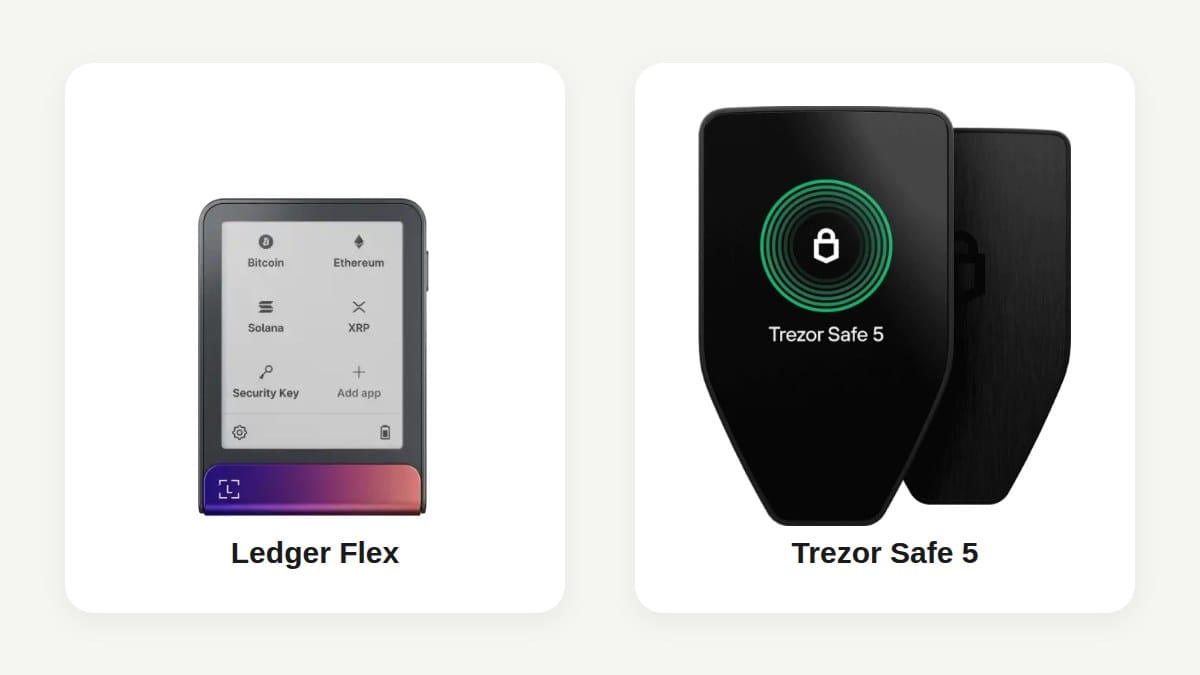
Ledger vs Trezor is often reduced to “more coins” versus “open source.” That is too shallow to help a buyer choose a hardware wallet.
Affiliate disclosure: This comparison contains tracked Ledger and Trezor links. Cryptophia Research may earn a commission from a qualifying purchase at no extra cost to you. Commercial relationships do not determine the conclusion. Read the Affiliate Disclosure and How We Research.
My judgment: choose Trezor when inspectable firmware, flexible recovery design and a simpler trust model matter most. Choose Ledger when broad app integration, polished mobile use and frequent transaction review across many networks matter more than having the secure operating system fully open.
Neither brand is universally safer. Ledger and Trezor protect the same private-key problem through different architectures, software ecosystems and recovery assumptions. The better device is the one whose failure modes you understand and can recover from.
Ledger vs Trezor: the quick verdict
| Buyer priority | Better fit | Why |
|---|---|---|
| Open and inspectable firmware | Trezor | Trezor publishes device firmware and documentation for independent review. |
| Broad multi-chain app ecosystem | Ledger | Ledger Wallet and third-party integrations cover a wide range of assets, DeFi and NFT workflows. |
| Large secure screen for regular signing | Either | Ledger Flex, Stax and Nano Gen5 use secure E Ink touchscreens; Trezor Safe 7 and Safe 5 provide colour touchscreens. |
| Share-based recovery design | Trezor | Trezor supports multi-share backup options alongside standard wallet backups and passphrases. |
| Optional guided identity-based recovery | Ledger | Ledger Recover is optional and aimed at users who prefer a subscription recovery service. |
| Bitcoin-only simplicity | Trezor, or neither | Bitcoin-only Trezor firmware is available; advanced users may prefer a narrower Bitcoin signer such as COLDCARD or BitBox02 Bitcoin-only. |
| Beginner who values transparency | Trezor Safe series | The security model and recovery options are easier to inspect and explain. |
| Active multi-chain mobile user | Ledger Flex or Nano Gen5 | The Ledger ecosystem is more integrated for frequent use across apps and networks. |
The shortest answer is this: Trezor is the cleaner choice when transparency and independent recovery are the priority. Ledger is the stronger fit when integration and readable day-to-day signing are the priority.
The main difference is the trust model
Both Ledger and Trezor are hardware signers. They keep private keys away from an ordinary phone or computer and require physical approval before a transaction is signed. Your crypto remains on the blockchain; the device protects the keys and the signing process.
The disagreement begins with what must be trusted.
How Trezor approaches security
Trezor publishes its firmware and makes the device architecture inspectable. The current Safe range also uses secure elements for physical protection. Trezor Safe 7 combines an auditable TROPIC01 secure element, an additional secure element and the main microcontroller as separate hardware layers. Safe 5 and Safe 3 also use certified secure elements.
2026 TROPIC01 disclosure: Ledger Donjon disclosed a laser fault-injection attack against the TROPIC01 chip on June 3, 2026. The research demonstrated that an attacker with physical laboratory access could bypass firmware-signature verification and run arbitrary firmware on the chip; subsequent coordinated work identified further paths affecting secrets protected by TROPIC01. This is material evidence about one layer used in Safe 7, but it is not equivalent to a demonstrated theft of a Safe 7 wallet. Trezor states that Safe 7 layers TROPIC01 with a second secure element, the main microcontroller and PIN protections, and that the disclosed chip attack does not by itself reveal the wallet backup, PIN or funds. My conclusion therefore does not change to “Safe 7 is hacked”; the disclosure does mean buyers should treat physical fault injection against TROPIC01 as a documented residual risk rather than assuming an open secure element is automatically immune to invasive attacks.
Open firmware does not prove that every line is perfect or that every user independently verified the installed binary. It does make external scrutiny, reproducible review and public discussion possible. The trade-off is that the user must still trust the supply chain, official software, boot process and the quality of the review ecosystem.
How Ledger approaches security
Ledger centres the device around a Secure Element and a proprietary operating system. The secure screen and approval interface are driven through that protected architecture. Ledger publishes applications and parts of its software stack, but the secure operating system is not fully open in the same way as Trezor firmware.
That does not make Ledger unsafe. It creates a stronger vendor-trust boundary: the buyer relies more heavily on Ledger and its security assurance process for the closed components. In return, Ledger offers a tightly integrated signer, app and secure-screen ecosystem.
Which security model is better?
There is no honest one-word winner.
- Choose Trezor when you want the core device behaviour to be as inspectable as practical and you are comfortable assessing an open-source security model.
- Choose Ledger when you accept proprietary secure-device software in exchange for a more integrated ecosystem and secure-screen workflow.
- Choose neither as a complete solution if your backup is photographed, typed into a website, stored in cloud notes or recoverable by one untrusted person. The strongest device cannot protect a disclosed recovery secret.
Ledger and Trezor product lines compared
The comparison should be between devices serving the same job, not between the cheapest Trezor and the most expensive Ledger.
| Use case | Ledger options | Trezor options |
|---|---|---|
| Premium touchscreen signer | Ledger Stax | Trezor Safe 7 |
| Mainstream touchscreen signer | Ledger Flex or Nano Gen5 | Trezor Safe 5 |
| Lower-cost modern signer | Ledger Nano S Plus or Nano X | Trezor Safe 3 |
| Legacy discontinued entry model | — | Trezor Model One (discontinued) |
| Legacy discontinued touchscreen model | — | Trezor Model T (discontinued) |
Ledger Stax, Ledger Flex and Nano Gen5 focus on secure E Ink touchscreens and clearer transaction review. Nano X and Nano S Plus retain smaller screens and button-based interaction. Trezor Safe 7 and Safe 5 provide larger colour touchscreens, while Safe 3 offers the current security architecture in a simpler form.
Do not choose only from a product name. Compare screen size, supported connection method, backup workflow, the exact wallet app you will use and whether the device can display the transaction details that matter to you.
Transaction verification matters more than coin count
A hardware wallet protects a private key, but the user still decides what to sign. Malware can replace an address on the computer screen. A malicious dApp can request a broad token approval. A compromised interface can describe one action while building another transaction.
The trusted device screen is where the user should verify the destination, amount, network and contract intent.
Ledger Clear Signing
Ledger promotes Clear Signing for supported transactions. On compatible flows, the secure screen can show human-readable transaction details instead of opaque data. Ledger Flex, Stax and Nano Gen5 are especially suited to this because their larger secure touchscreens provide more room for review.
Clear Signing is not universal protection. It depends on the application, network and transaction type supplying reliable structured information. Unsupported transactions can still require blind signing or incomplete review.
Trezor transaction review
Trezor Safe 7 and Safe 5 also provide large screens that make address and transaction verification easier. Trezor Suite and third-party wallet integrations determine how much human-readable context reaches the device.
The practical question is not whether Ledger or Trezor uses better marketing language. It is whether the exact transaction you plan to make can be independently understood on the signer. If not, use a separate low-value operational wallet rather than exposing the wallet holding long-term savings.
Ledger Wallet vs Trezor Suite
The companion app affects daily usability, asset support, privacy choices and the chance of making a mistake.
Ledger Wallet
Ledger Wallet (formerly Ledger Live) provides portfolio viewing, account management, device applications and access to supported buy, sell, swap, staking and third-party services. Ledger devices also connect to external wallet apps for networks and workflows not handled entirely inside Ledger Wallet.
The advantage is breadth and integration. The disadvantage is a larger product surface: more apps, services and transaction types create more permissions and more opportunities to confuse a convenient interface with an independently verified action.
Trezor Suite
Trezor Suite provides account management, send and receive functions, portfolio tools and integrated services for supported assets. Some coins and networks require compatible third-party wallet apps even when the Trezor firmware can secure the keys.
Trezor Suite generally feels narrower and easier to inspect. That simplicity is useful for a long-term holder. It may feel limiting to an active multi-chain user who wants many services and integrations under one interface.
Which app is better?
- Ledger Wallet is better for a user who values broad integration and intends to use the signer frequently across several ecosystems.
- Trezor Suite is better for a user who values a simpler, more transparent self-custody workflow.
- Neither app should become the source of truth for a destination address, token contract or recovery secret. Verify through independent official sources and the hardware screen.
Supported coins, tokens, NFTs and DeFi
Ledger generally offers the broader application ecosystem. Its devices support thousands of assets through Ledger Wallet applications and third-party wallet integrations. That makes Ledger attractive for users holding many networks or interacting with DeFi and NFT applications.
Trezor supports major assets including Bitcoin, Ethereum and tokens, Solana, Cardano, XRP and many other networks, with support varying by model and between Trezor Suite and third-party apps. A coin being supported by the firmware does not always mean every function—viewing, staking, swapping or dApp use—is available inside Trezor Suite.
Before buying either hardware wallet, check five separate questions:
- Can the device secure the private keys for the asset?
- Can the first-party app display and manage the account?
- Can the device send and receive on the exact network required?
- Does staking or dApp use require a third-party wallet?
- Can the signer display the transaction clearly enough to verify it?
“Supports thousands of coins” is not a security conclusion. Every additional chain, parser and integration is useful only when the owner actually needs it.
Backup and recovery: where the brands differ most
The hardware device can be replaced. The recovery design is what determines whether the wallet survives loss, damage, company failure or the owner becoming unavailable.
Trezor recovery options
Trezor supports standard wallet backups, passphrases and multi-share recovery options on compatible devices. Multi-share backup can distribute recovery across locations or people so that no single share is sufficient.
That flexibility is powerful and easy to misuse. A share scheme that nobody can reconstruct, a forgotten passphrase or an undocumented threshold can permanently lock out the owner and heirs. Use the simplest design that solves a real threat, then test it.
Ledger recovery options
Ledger supports the standard recovery phrase and includes Ledger Recovery Key with current touchscreen signers. Ledger also offers Ledger Recover, an optional paid subscription that allows eligible users to restore wallet access through an identity-based process.
Ledger Recover is optional. A user who does not want an identity provider or subscription involved can continue to manage the recovery phrase independently. The correct question is not whether the service exists; it is whether its trust and privacy model fits the owner.
Can a Ledger wallet be recovered on a Trezor, or vice versa?
Standard recovery phrases can often be restored on another compatible wallet, but compatibility depends on the backup standard, word count, passphrase, derivation path, asset and wallet software. A cross-brand recovery should never be assumed during an emergency.
Document the backup type and test recovery safely before storing meaningful value. Never type the real recovery phrase into a website or ordinary computer merely to test compatibility.
Is Ledger safe after the Recover controversy?
Ledger Recover created concern because it demonstrated that supported Ledger devices can, with explicit user approval and compatible firmware, participate in an encrypted backup process. Some users interpreted that as evidence that the security model required more vendor trust than they had assumed.
The correct conclusion is narrower:
- Ledger Recover is optional and requires user activation.
- The service changes the recovery trust model for subscribers.
- The controversy made Ledger’s proprietary architecture and firmware trust boundary more visible.
- It did not prove that every Ledger device automatically exports recovery material or that ordinary users lose control without subscribing.
Users who require a fully inspectable firmware path may still prefer Trezor. Users who accept Ledger’s architecture can reasonably choose Ledger while declining the optional service.
Can crypto be stolen from Ledger or Trezor?
Yes. A hardware wallet reduces particular attack paths; it does not make theft impossible.
Assets can still be lost through:
- recovery phrase theft;
- phishing and fake support;
- approving a malicious or misunderstood transaction;
- buying a pre-initialised or tampered device;
- weak PIN or passphrase handling;
- using the wrong network or destination address;
- physical coercion;
- an undiscovered device, firmware or supply-chain vulnerability.
Neither Ledger nor Trezor can protect a recovery phrase entered into a fake website. Neither can reverse a transaction the owner knowingly approved. The device works only when the backup and verification process work with it.
Which is better for Bitcoin?
Trezor has a strong case for Bitcoin holders because of its open firmware, Bitcoin-only options and flexible backup design. A Bitcoin-only Trezor removes unrelated coin support from the active firmware and can simplify the threat model.
Ledger supports Bitcoin well and may be preferable for someone who also wants a broader multi-chain ecosystem. But a holder building rarely used, high-value Bitcoin cold storage should also compare dedicated Bitcoin signers such as COLDCARD, BitBox02 Bitcoin-only or Foundation Passport rather than assuming the choice ends with Ledger vs Trezor.
Current COLDCARD caveat: Coinkite’s July 30, 2026 advisory, updated August 1, says the seed-generation issue affects Mk2 and Mk3 firmware 4.0.1 through 4.1.9 inclusive; Mk4 and Mk5 before standard firmware 5.6.0 or Edge 6.6.0X; and Q before standard firmware 1.5.0Q or Edge 6.6.0QX. Coinkite says at least 50 fair, independent and private dice rolls can supply enough independent entropy that the resulting seed is not considered at risk from this RNG issue alone. A strong, unique BIP-39 passphrase is also an independent barrier that reduces immediate exposure, but it does not repair an affected seed; Coinkite still advises passphrase users to migrate as soon as practical. Fixed firmware prevents the problem for newly generated seeds but does not repair an existing affected seed. Follow Coinkite’s current security advisory to install the fixed firmware, generate and verify a replacement seed, test the new wallet and migrate funds carefully.
Which is better for beginners?
A beginner needs a wallet that is difficult to misuse, not merely one with the most features.
Trezor Safe 3, Safe 5 or Safe 7 is the stronger default for a beginner who wants a transparent, understandable self-custody system. The choice among them depends mainly on budget, screen and desired backup workflow.
Ledger Flex or Nano Gen5 is the stronger beginner fit for someone actively using several networks who will benefit from a larger secure screen and Ledger’s integrated app ecosystem.
The older and cheaper devices can still secure keys, but small displays and multi-step navigation make careful verification harder. For meaningful holdings, screen clarity and recovery design deserve more weight than saving a modest amount on the purchase.
Privacy, tax reporting and buying safely
A Ledger or Trezor device does not itself file a tax report or identify the owner to a tax authority. However, purchases, companion services, exchanges and third-party providers can collect identity, payment or transaction information under their own terms. Blockchain transactions remain public on transparent networks.
Buy directly from the manufacturer or an authorised seller. Trezor states that its official Amazon storefront and authorised resellers are acceptable sources, but an unauthorised third party creates an unnecessary supply-chain risk. The same principle applies to Ledger.
Never use recovery words included in a box. A legitimate device generates the wallet backup during setup. Support staff do not need the words.
Ledger vs Trezor decision matrix
- Choose Trezor if you value: open firmware, a simpler trust model, multi-share recovery, Bitcoin-only options and independent auditability.
- Choose Ledger if you value: broad asset support, Ledger Wallet integration, secure E Ink touchscreens, Clear Signing on supported flows and frequent multi-chain use.
- Choose a narrower Bitcoin signer if: you hold Bitcoin only, transact rarely and are willing to learn a more specialised workflow.
- Choose multisig or professional custody planning if: one lost device, one backup or one person’s mistake could cause a life-changing loss.
Final verdict
Ledger vs Trezor is not a contest between a secure brand and an insecure one. It is a choice between different evidence and recovery models.
Trezor is my default recommendation for a long-term holder who wants an inspectable device, clear recovery design and less ecosystem complexity. Ledger is my recommendation for an active multi-chain user who will genuinely use its secure screens, Ledger Wallet integrations and supported Clear Signing flows.
Whichever hardware wallet you choose, the decisive controls remain the same: initialise it yourself, protect the wallet backup, verify every destination on the device, test recovery and keep high-value savings separate from routine dApp activity.
Use this comparison with the Best Hardware Wallets threat-model guide, then follow the hardware wallet setup checklist before depositing meaningful value.
Check current Trezor Safe 7 availability → Check current Ledger Flex availability →
Primary sources
- Trezor security and firmware architecture
- Trezor secure elements
- Trezor: TROPIC01 chip disclosure response
- Trezor: TROPIC01 vulnerability disclosure details
- Ledger Donjon: TROPIC01 laser fault-injection research
- Trezor supported coins and tokens
- Ledger hardware wallet comparison
- Ledger signer features
- Ledger Recover documentation
- Ledger: current Ledger Wallet naming
- Coinkite: COLDCARD seed-generation security advisory